YouTube Keyword Research, Minus the Generic Advice
The standard YouTube keyword advice is something like: brainstorm seeds, use autocomplete, check competition, optimize title and description. None of this is wrong. All of it skips the part where you have to actually make decisions, which is where most people get stuck.
This post is what I'd tell a friend who's starting a YouTube channel and asked me how to think about keywords. I'm assuming you already know the basics. I want to give you the parts I had to learn the hard way.
YouTube search is not Google search
I had to internalize this before anything else made sense. On Google, the system is trying to deliver the answer to your query. On YouTube, the system is trying to maximize how much time you spend on YouTube.
That second framing changes what gets rewarded. A perfectly relevant 8-minute video with great keyword optimization loses to a less relevant 14-minute video that holds attention longer. The algorithm cares about watch time, click-through rate, and session duration. Keywords are how you get into the consideration set. Watch time is what gets you to rank.
This means keyword research for YouTube has a different goal than keyword research for blogs. For blogs, you're trying to find low-competition keywords you can rank for. For YouTube, you're trying to find topics where the audience will watch long videos that lead them into watching more of your videos.
Volume is often less interesting than topic stickiness.
The two-mode model
When I'm thinking about a video, I sort it into one of two modes. They have completely different keyword strategies.
Search-driven videos. Tutorials, how-tos, reviews, comparisons. People are actively looking for them. Keyword research matters a lot. Optimize title for the exact phrase people search.
Browse-driven videos. Vlogs, opinion pieces, experimental formats, deep-dives on niche topics. People discover them in their recommendations feed, not search. Keyword research matters much less. What matters is thumbnail, title hook, and the first 30 seconds.
Most channels need both. Search-driven videos build a foundation of evergreen traffic from people who don't know your channel. Browse-driven videos build community and rewatch behavior from people who already do. You can't replace one with the other.
Beginners almost always overweight search-driven content because it's the kind keyword tools optimize for. This is a mistake. The most successful small channels I've watched grow had a mix from the start.
Doing the actual keyword research
For search-driven videos, here's the workflow I use.
Start with YouTube autocomplete. Not Google autocomplete. They're different databases. A phrase that's hot on Google might be invisible on YouTube and vice versa.
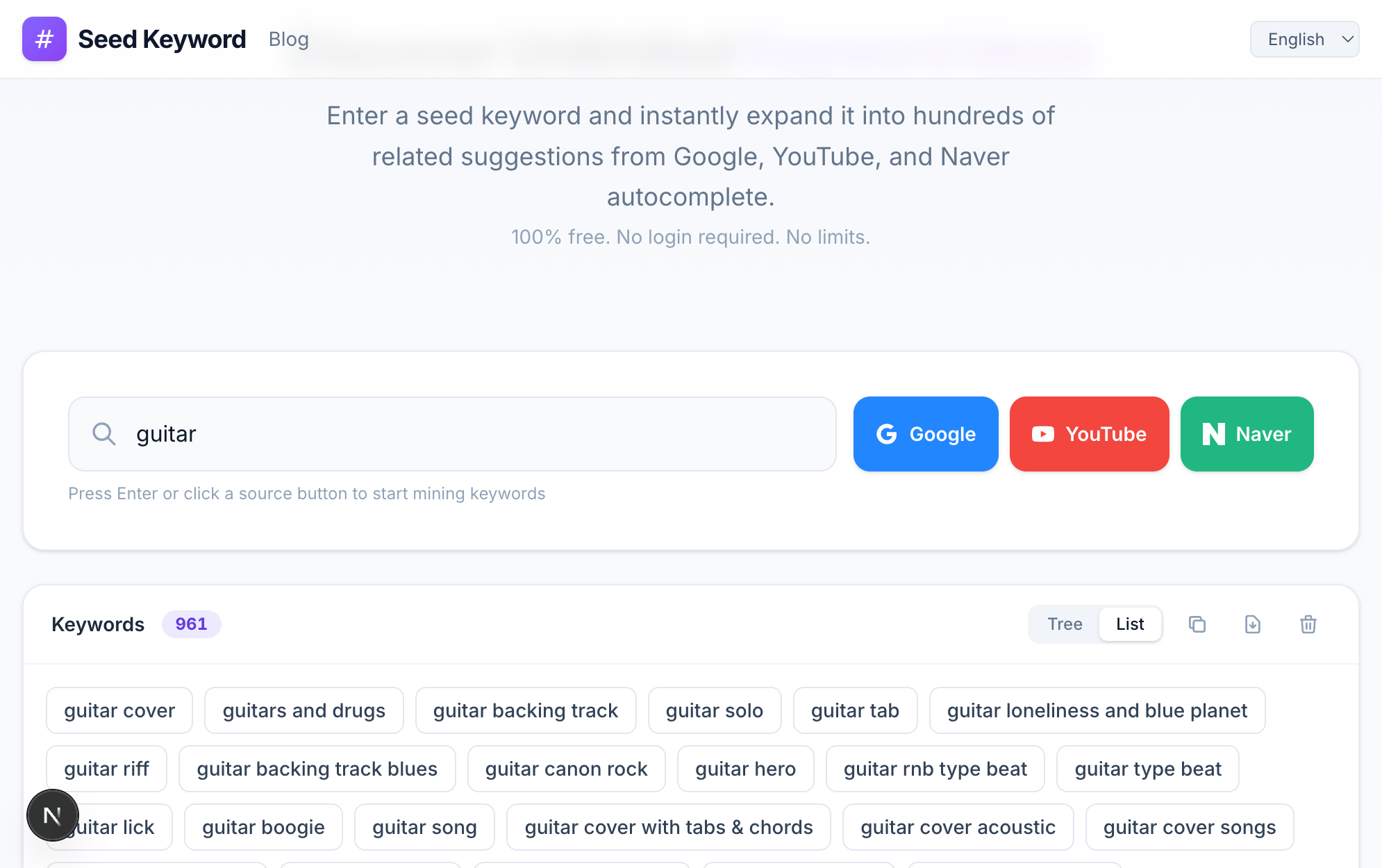
This is "guitar" run through YouTube's autocomplete, not Google's. Look at the results — "guitar cover," "guitar backing track," "guitar solo," even song titles. These are video intents, not blog intents. Google's autocomplete for the same seed leans toward "guitar chords" and "guitar tuner" instead.
Type your seed and write down everything that appears. Then take each suggestion and use it as a new seed. After two rounds you have a tree. The leaves of this tree are your candidate video topics. (The mechanics of seeds and recursive expansion are covered in what seed keywords are and how to find long-tail keywords.)
Now for each candidate, search it on YouTube and look at the top five results. You're checking three things:
- View counts. If the top five all have 50,000+ views, the topic has demand. If the top result has 800 views, either there's no demand or the keyword is too obscure.
- Channel size. If the top results are from channels with millions of subscribers, you'll have a hard time outranking them with a new channel. Look for keywords where small channels are in the top results.
- Video age and quality. Old top results with low view counts often mean a fresh, well-produced video could take that spot.
This whole process per video takes maybe ten minutes. The cost of skipping it is much higher than the cost of doing it.
What I've stopped doing
A few practices I used to do that I've quietly dropped.
I don't obsess over tags anymore. They mattered more five or six years ago. Today they're a minor signal. Front-loading your keyword in the title and including it naturally in the description is much more important.
I don't use TubeBuddy or VidIQ's "scores" as anything more than a vague directional signal. The scoring algorithms are opaque and I've seen too many cases where a "low score" video did well and a "high score" video flopped. Use them for the autocomplete and competition data, ignore the proprietary scores.
I don't try to stuff multiple keywords into a title anymore. Pick the one phrase you actually want to rank for, put it near the start, then write the rest of the title as something a human would click. "Beginner Guitar | Easy Songs to Learn First | 2026 Tutorial" is keyword stuffing. "The 5 Easiest Guitar Songs to Learn (Beginner Friendly)" is a title that contains a keyword and also looks like a normal video. Massive difference in click-through rate.
Titles, briefly
Titles are where keyword research meets copywriting, and the copywriting half matters more than people think.
A few rules that have served me well:
- The keyword should be near the front when possible.
- Numbers in titles still work, somehow, despite everyone using them forever.
- Curiosity beats completeness. "Why I switched from Premiere to DaVinci" outperforms "DaVinci Resolve vs Premiere Pro complete comparison" most of the time.
- Avoid clickbait that the video doesn't deliver on. The watch-time penalty when people click and bounce is brutal.
The best titles in my experience are short, contain the keyword, and create a small open loop. "I tried 5 budget cameras for a week" is open-loop. The viewer wants to know which won. They click.
Thumbnails matter more than keywords
This isn't strictly a keyword research point but it's the single most underrated factor on YouTube. A great keyword strategy with a mediocre thumbnail will lose to a so-so keyword strategy with a great thumbnail. Click-through rate drives everything, and the thumbnail drives click-through rate.
If you're going to spend 4 hours on a video, spend 30 minutes on the thumbnail. Not 30 seconds. Half an hour. Test alternatives. Look at what your competitors are doing in the same niche and figure out how to be visually distinct from them while still looking like you belong in the category.
I bring this up in a keyword research post because I see people obsess over their keyword tools while shipping thumbnails they made in 90 seconds. That ratio of effort is backwards.
A note on AI Overviews and YouTube's place in search
In 2026 the search landscape is in flux. Google's AI Overviews now answer many informational queries directly, and a portion of traffic that used to go to text-based blogs has shifted toward YouTube as a result. People who want a quick fact get the AI answer. People who want to actually learn something increasingly skip to YouTube. (I unpack this shift in keyword research in the age of AI Overviews.)
If you're choosing between starting a blog and a YouTube channel in 2026, this is one reason YouTube is, in my honest opinion, the better bet for most niches. The format is more defensible against AI summarization, the discovery mechanics are more forgiving for new creators, and the keyword research methods are not yet as commoditized as they are for blog SEO.
Anyway. Mine YouTube autocomplete, evaluate competition by looking at the actual SERP, mix search and browse content, and put more effort into your thumbnails than feels reasonable. That's most of what I know.